
Design Your Own Christmas Card
Final Result

Step 1. Creating a background
Start with a new document with 400x700 px. Create a new layer and make a radial gradient going from dark green to a lighter green.

Now we are making a snowflake background. Download snowflake brush set (Attachment)
Create a new layer. Make your foreground color white. Choose Brush Tool (B), make Opacity=20%, select a snowflake brush you like most and set these parameters:
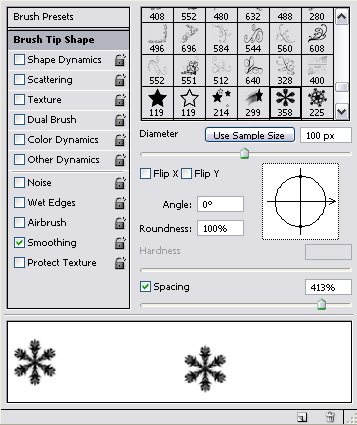


And you will get this result:

Now download these swirls custom shapes Arabeski & Swirls (attachment)
Create a new layer with the following parameters:


Choose Custom Shape Tool (U) and select the biggest shape to create a bottom of the christmas tree.
Don't forget to use Shift to get proportional shape.

Now move this shape to the bottom of the card.

Create new layer with the same parameters, choose another swirl and repeat previous actions.

Now we have a silhouette of the Christmas tree. Next choose second type of custom shape you've downloaded and correct the silhouette. Use the same settings as before.
This is my result so far:

To make it more snowish add snowflakes. Download Christmas custom shape set(attachment) Chose a snowflake, use the same parameters as before.

Add more snowflakes..

Put a big snowflake at the top of the Christmas tree:

Now to make our greeting card complete we should add greetings.
Create a new layer with the same parameters as before, except Drop Shadow, change it to:

Choose Horizontal Type Tool (T) with following settings:

And type your greetings.
That's all!
Merry Christmas
2
All
...MHOins...

Forum : www.MumbaiHangout.net
------------------
DISCLAIMER :
------------------
This message serves informational purposes only and should not be viewed as an irrevocable indenture between anyone. If you have erroneously received this message, please delete it immediately and notify the sender at MumbaiHangOut-Owner@yahoogroups.com. The recipient acknowledges that any views expressed in this message are those of the Individual sender and no binding nature of the message shall be implied or assumed unless the sender does so expressly with due authority of The M.H.O. Group. M.H.O. reserves the right to repeal, change, amend, modify, add, or withdraw the contents herein without notice or obligation.
---------------------------------------------------
Note:- MHO is Not Responsible For Any Claims.
---------------------------------------------------

Change settings via the Web (Yahoo! ID required)
Change settings via email: Switch delivery to Daily Digest | Switch format to Traditional
Visit Your Group | Yahoo! Groups Terms of Use | Unsubscribe
__,_._,___

No comments:
Post a Comment